[NUC] Wireless Keyboard or Mouse Has a Short Connection Range
Resolution
Radio interference (noise) on the 2.4 GHz ISM band can affect connectivity between USB 3.0 ports and wireless devices, like keyboards and mice.
- Experiment with the placement of the wireless receiver dongle. Try to position it away from the USB 3.0 ports on the computer. Placing the wireless dongle away from the USB 3.0 ports can reduce the impact of noise, even though it does not eliminate it completely.
- Consider connecting the wireless dongle to a USB extension cable or hub, which is placed away from the computer.
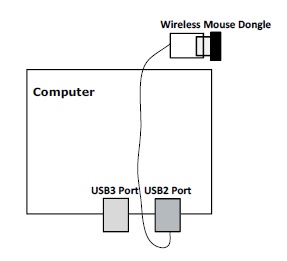
The following white paper includes more detailed information about this radio interference issue.
USB 3.0* Radio Frequency Interference (PDF) 
Size: 990 KB
Date: April 2012