[Lyra][Application]How to use “WiFi block list” on Lyra to block unknown devices from connecting to your WiFi network?
The WiFi block list is used to restrict unknown devices from connecting to your Wi-Fi network.
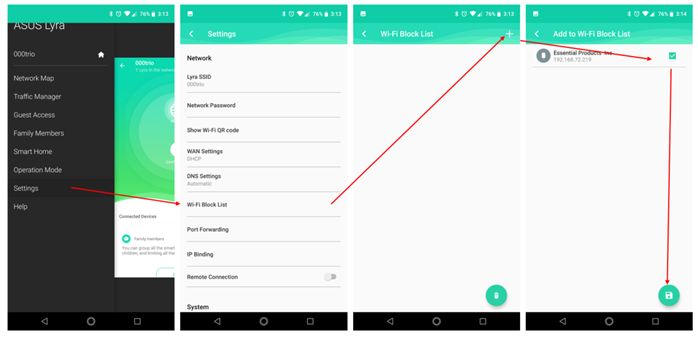
1. In the Lyra app, go to Settings.
2. Click “Wi-Fi Block List”.
3. Click “+” on the top-right corner.
4. Select the devices that you want to block.
5. Click the Save icon.
6. It will take 2~3 minutes to finalize all settings to every node, please wait until all nodes turn to “solid blue”.