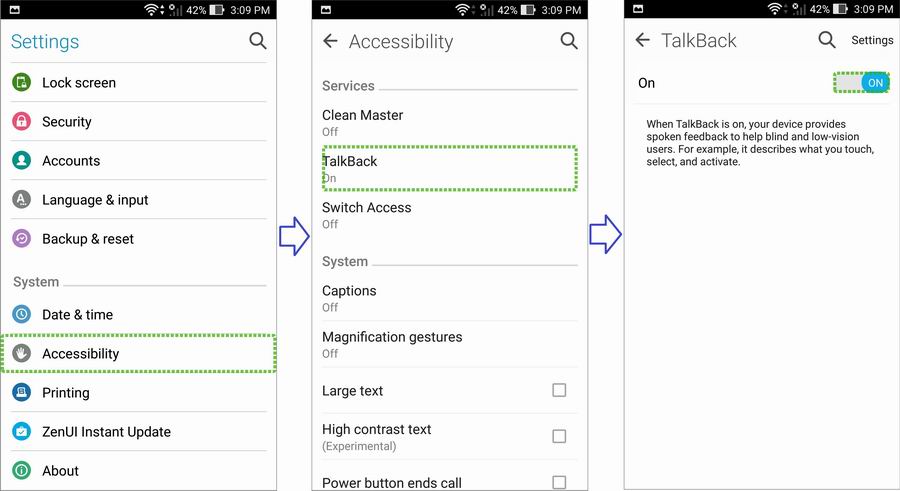
[Troubleshooting] Screen touch malfunction caused by accessibility tool "TalkBack"
When "TalkBack" function is enabled, its feature of an accessibility tool may lead to users' misunderstanding that the touch function is failed.
How to operate your phone in TalkBack mode
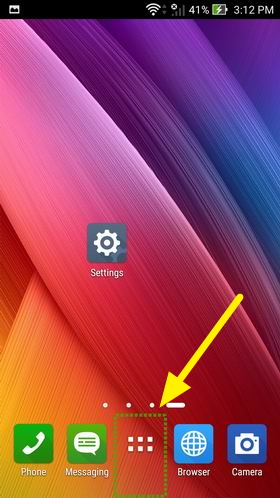
In TalkBack mode, you have to tap the icon first to make a dotted green rectangle appeared around the icon (as shown in picture below) and then tap the icon twice to perform the function. Similarly, on any keyboard, enter a number or a letter by tapping it once (to let device know you are going to lock it) and then tapping it twice. Also, you have to swipe the screen by two fingers instead of one finger.
For more information, please refer to Google page: TalkBack gestures
How to disable TalkBack
1. Tap "All apps" to make a green rectangle appeared and then tap "All apps" twice.
2. By the same way stated in Step 1, disable "TalkBack" in "Settings" -> "Accessibility".