[NUC] Informacje o module Trusted Platform (TPM) dla NUC
| Uwaga | System Windows* 11 wymaga modułu Trusted Platform Module (TPM), jak to zostało określone w wymaganiach systemowych. |
Przegląd
- Moduł Trusted Platform Module (TPM 2.0) - TPM 2.0 to mikrokontroler przechowujący klucze, hasła i certyfikaty cyfrowe. Odrębny moduł TPM 2.0 obsługuje również technologię vPro™ i technologię Trusted Execution Technology (TXT).
- Platform Trust Technology (PTT) - Platform Trust Technology (PTT) oferuje możliwości odrębnego modułu TPM 2.0. Intel PTT to funkcjonalność platformowa do przechowywania poświadczeń i zarządzania kluczami, która jest używana w systemach Windows 8*, Windows® 10 i Windows* 11. Intel PTT obsługuje BitLocker* do szyfrowania dysku twardego i spełnia wszystkie wymagania firmy Microsoft dotyczące modułu Trusted Platform Module (fTPM) 2.0 w firmware.
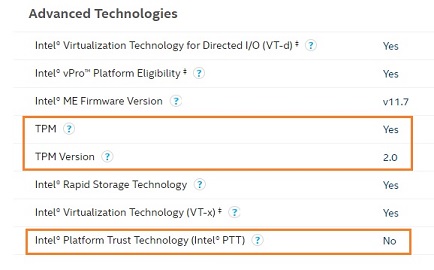
Sprawdź, czy twój NUC obsługuje te technologie
Sprawdź specyfikacje swojego komputera Intel NUC na stronie ark.intel.com, w sekcji Zaawansowane technologie.
Rozwiązywanie problemów
- Jak włączyć moduł Trusted Platform Module (TPM 2.0) na NUC
- Nieznany błąd urządzenia w Menedżerze urządzeń związany z TPM lub PTT
- Intel-SA-00104 dla modułu Trusted Platform Module (TPM) firmy Infineon*
Platform Trust Technology (PTT) Recertification Service uses 30-40% of CPU usage
If you are experiencing high CPU usage on your computer, it may be due to the Platform Trust Technology (PTT) Recertification Service. This service is responsible for verifying the integrity of the firmware on your device's Trusted Platform Module (TPM), which is a security feature that helps protect sensitive data.
To reduce the CPU usage caused by the PTT Recertification Service, you can try disabling and re-enabling the TPM in your computer's BIOS settings. You can also check for updates to your computer's firmware and the PTT Recertification Service.
For more information and detailed instructions, refer to the Intel support article.