Modell Name
Supportseite Link
RT-AC66U
http://www.asus.com/ch-de/Networking/RTAC66U/#support_Download
RT-AC66R
http://www.asus.com/ch-de/Networking/RTAC66R/#support_download
RT-AC56U
http://www.asus.com/ch-de/Networking/RTAC56U/#support_Download
RT-AC52U
http://www.asus.com/ch-de/Networking/RTAC52U/#support_Download
RT-N66U
http://www.asus.com/ch-de/Networking/RTN66U/#support_Download
RT-N66R
http://www.asus.com/ch-de/Networking/RTN66R/#support_Download
RT-N66W
RT-N65U
http://www.asus.com/ch-de/Networking/RTN65U/#support_Download
RT-N65R
http://www.asus.com/ch-de/Networking/RTN65R/#support_Download
RT-N56U
http://www.asus.com/ch-de/Networking/RTN56U/#support_Download
RT-N16
http://www.asus.com/ch-de/Networking/RTN16/#support_Download
RT-N15U
http://www.asus.com/ch-de/Networking/RTN15U/#support_Download
RT-N14U
http://www.asus.com/ch-de/Networking/RTN14U/#support_Download
RT-N10U B
http://www.asus.com/ch-de/Networking/RTN10U_B/#support_Download
RT-N10U
http://www.asus.com/ch-de/Networking/RTN10U/#support_Download
DSL-N66U
http://www.asus.com/ch-de/Networking/DSLN66U/#support_Download
DSL-N55U Annex A
http://www.asus.com/ch-de/Networking/DSLN55U_Annex_A/#support_Download
DSL-N55U Annex B
http://www.asus.com/ch-de/Networking/DSLN55U_Annex_B/#support_Download
Schritte:
1 . Wie wird das Firmware Upgrade durchgeführt: http://www.asus.com/support/Search-Result-Detail/8FD9F1B3-90FC-434F-BB53-F6D7A4AE010C/?keyword=router%20firmware
2. Wie ändert man manuell FTP Login Erlaubnis für Administrator:
Gehen Sie zu ASUSWRT>"USB Application">"Servers Center"
Klicken Sie “FTP share" und dann "share with account".
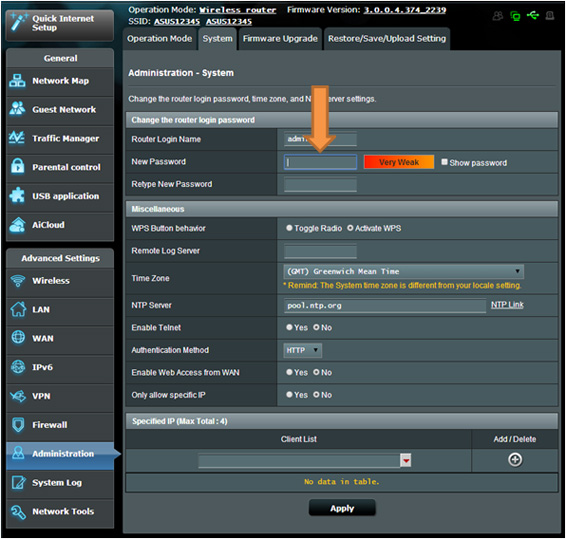
Wie ändert man das voreingestellte Firmware Passwort
Gehen Sie auf ASUSWRT>"Administration">"System“, geben Sie den neuen Login Namen und Passwort ein und klicken Sie unten auf "Apply"