Modèles et pilotes :
 

Nom du modèle

Lien vers site de support

 
  RT-AC68U http://www.asus.com/ch-fr/Networking/RTAC68U/#support_Download  
 

RT-AC66U

http://www.asus.com/ch-fr/Networking/RTAC66U/#support_Download


RT-AC66R

http://www.asus.com/ch-fr/Networking/RTAC66R/#support_download


RT-AC56U

http://www.asus.com/ch-fr/Networking/RTAC56U/#support_Download


RT-AC52U

http://www.asus.com/ch-fr/Networking/RTAC52U/#support_Download


RT-N66U

http://www.asus.com/ch-fr/Networking/RTN66U/#support_Download


RT-N66R

http://www.asus.com/ch-fr/Networking/RTN66R/#support_Download


RT-N66W

http://www.asus.com/ch-fr/Networking/RTN66W/#support_Download  
 

RT-N65U

http://www.asus.com/ch-fr/Networking/RTN65U/#support_Download


RT-N65R

http://www.asus.com/ch-fr/Networking/RTN65R/#support_Download


RT-N56U

http://www.asus.com/ch-fr/Networking/RTN56U/#support_Download


RT-N16

http://www.asus.com/ch-fr/Networking/RTN16/#support_Download


RT-N15U

http://www.asus.com/ch-fr/Networking/RTN15U/#support_Download


RT-N14U

http://www.asus.com/ch-fr/Networking/RTN14U/#support_Download


RT-N10U B

http://www.asus.com/ch-fr/Networking/RTN10U_B/#support_Download


RT-N10U

http://www.asus.com/ch-fr/Networking/RTN10U/#support_Download


DSL-N66U

http://www.asus.com/ch-fr/Networking/DSLN66U/#support_Download


DSL-N55U Annex A

http://www.asus.com/ch-fr/Networking/DSLN55U_Annex_A/#support_Download


DSL-N55U Annex B

http://www.asus.com/ch-fr/Networking/DSLN55U_Annex_B/#support_Download


Instructions :

1 . Comment mettre le firmware à jour :
http://www.asus.com/support/Search-Result-Detail/8FD9F1B3-90FC-434F-BB53-F6D7A4AE010C/?keyword=router%20firmware


2. Comment changer manuellement les paramètres de permission d'accès au FTP pour seulement autoriser l'accès à l'administrateur :

Allez sur ASUSWRT > "Application USB" > "Centre serveurs"


Cliquez sur "Partage FTP" puis sur "Partager avec compte"


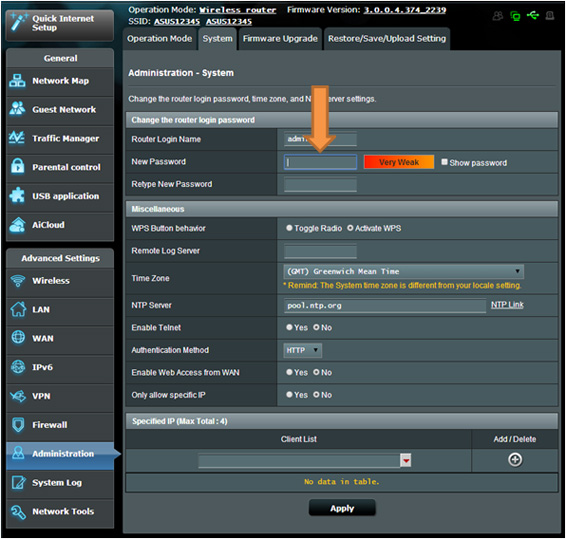
Comment changer le mot de passe donné par défaut pour le firmware

​Allez sur ASUSWRT > "Administration" > "Système", entrez le nouvel identifiant et le nouveau mot de passe puis cliquez sur le bouton "Appliquer" situé en bas de page.