[NUC] Windows 11* インストールが完了できない、「ネットワークに接続しています」ページがセットアップ中にインターネット接続を要求するため
解決策
Windows 11*オペレーティングシステムをインストールする際に、継続するためにインターネット接続が必要であることに気づくでしょう。
これは、ネットワークドライバ(OSが有線/無線ハードウェアを見るためのソフトウェア)がWindowイメージに含まれていない場合に問題になる可能性があります。
下の画像のように、ネットワークを選択するオプションや続行するオプションがありません。
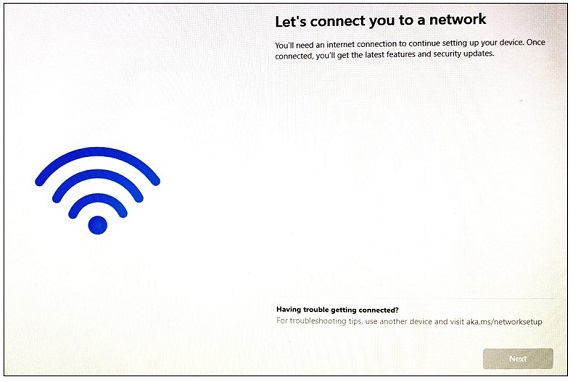
これを解決し、インストールを続行するには、以下の手順を実行してください。
- Shift+F10を押してコマンドプロンプトを開く(一部のラップトップではShift+Fn+F10を押す必要があります)
- プロンプトが表示された後、テキストを入力するためにウィンドウをクリックする必要がある場合があります
- oobe\bypassnroと入力する
- Enterを押します。システムは再起動し、セットアッププロセスを再開します
- 地域とキーボードを再度選択します
- 今度は、Let's connect you to a network画面に追加のオプションが表示されます。 I don't have internetをクリックします
- 次の画面で、Continue with limited setupをクリックします
セットアップ手順を続けて、オペレーティングシステムのインストールを完了してください。
| Note | Windowsでシステムの適切なネットワークドライバをダウンロードすることを確認してください。検索フィールドにシステムのモデルを入力することで、ここにすべての利用可能なドライバが表示されます。 |
サポートにお問い合わせ
上記の情報で問題が解決しない場合は、お問い合わせください。
- Above information might be partly or entirely quoted from exterior websites or sources. please refer to the information based on the source that we noted. Please directly contact or inquire the sources if there is any further question and note that ASUS is neither relevant nor responsible for its content/service
- This information may not suitable for all the products from the same category/series. Some of the screen shots and operations could be different from the software versions.
- ASUS provides the above information for reference only. If you have any questions about the content, please contact the above product vendor directly. Please note that ASUS is not responsible for the content or service provided by the above product vendor.