מוצר
NUC 11 Pro Kit, NUC 11 Pro Mini PC
[NUC] אפשרויות תצוגה מרובות למערכות NUC Kits NUC11TN
This guide provides the most common multiple display configuration options for the NUC11TN with 4 graphic ports:
- Two HDMI 2.0b ports.
- One Thunderbolt™ 4 port (DisplayPort Tunneling: ~35 Gbps).
- One Thunderbolt™ 3 port (DisplayPort Tunneling: ~17 Gbps).
| Note | NUC11TN models with a "Z" suffix don't have Thunderbolt™ ports. This article doesn't cover NUC11TN models with "Z" suffix. |
Before You Begin
We recommend you first update your Intel NUC to the latest BIOS and graphics driver, using Driver & Support Assistant
Three displays. Option 1
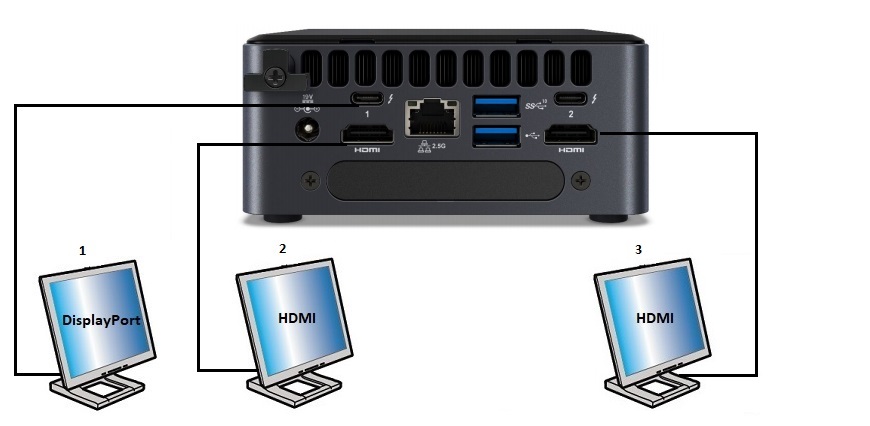
| תצוגה | פורט NUC של אינטל | פורט טלוויזיה/מסך | רזולוציית מקסימום נתמכת | ||||||||||||||||||||||||
| 1 | סוג C | DisplayPort | 5120x3200 ב-60Hz, 24 bpp1 | ||||||||||||||||||||||||
| Display | Intel NUC port | TV/monitor port | Maximum supported resolution |
| 1 | Type C | DisplayPort | 5120x3200 at 60Hz, 24 bpp1 |
Four displays. Option 1
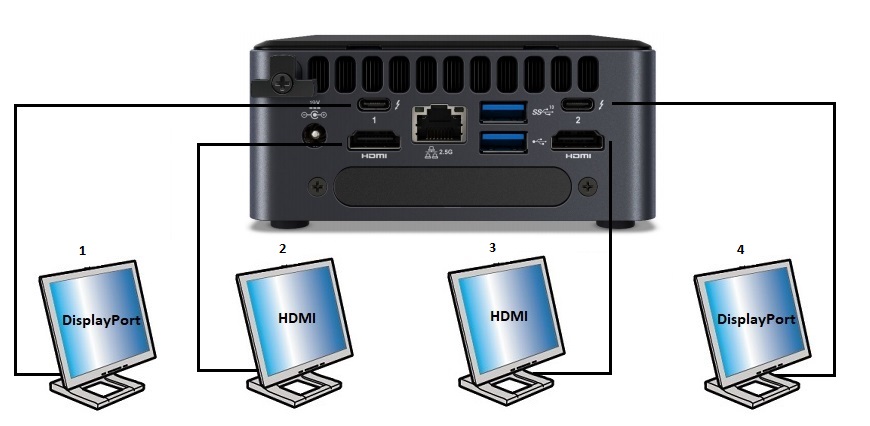
| Display | Intel NUC port | TV/monitor port | Maximum supported resolution |
| 1 | Type C | DisplayPort | 3840x2160 at 60Hz, 24 bpp1 |
| 2 | HDMI | HDMI | 3840x2160 at 60Hz, 24 bpp1 |
| 3 | HDMI | HDMI | 3840x2160 at 60Hz, 24 bpp1 |
| 4 | Type C | DisplayPort | 3840x2160 at 60Hz, 24 bpp1 |
נא להשאיר את התגי HTML ולהשתמש במתרגם לעברית.
תמיכה ברזולוציות תלויה ברוחב פס זיכרון
ככל שהרוחב הפס של הזיכרון גבוה יותר, כך תהיה היכולת לתמוך ברזולוציות גבוהות יותר.
שרשור דייזי (Daisy-chaining)
משמעות השרשור היא היכולת לחבר מספר מסכים באמצעות חיבור יחיד ביניהם. כל המסכים וכל הכבלים חייבים לתמוך במפרט DisplayPort 1.2.
פנייה לתמיכה
יש לפנות אלינו אם לא ניתן לפתור את הבעיה בעזרת המידע שלעיל
- Above information might be partly or entirely quoted from exterior websites or sources. please refer to the information based on the source that we noted. Please directly contact or inquire the sources if there is any further question and note that ASUS is neither relevant nor responsible for its content/service
- This information may not suitable for all the products from the same category/series. Some of the screen shots and operations could be different from the software versions.
- ASUS provides the above information for reference only. If you have any questions about the content, please contact the above product vendor directly. Please note that ASUS is not responsible for the content or service provided by the above product vendor.