










E410
AWARDS & REVIEWS
Hardwareluxx
luxx Awards - Hersteller des Jahres 2022 - Gaming-Notebooks
Hardwareluxx These are the manufacturers of the year 2022!
Más información
GERMANY
2022/08/22
pcgameshardware.de
Nr. 1 im Bereich Gaming bei: Grafikkarten, Mainboards, Displays, Notebooks
No. 1 in Gaming: Graphic Cards, Motherboards, Monitors, Laptops
Más información
GERMANY
2022/01/22
1 / 2

Enhanced Productivity

Upgraded Performance and Expandability


Intel
Smart Performance

Powered by the next generation Intel® Celeron® N3150 quad-core 1.6GHz SoC processor (2M Cache, up to 2.08GHz), significantly faster and more efficient than the previous Intel® Celeron® processors, E410 delivers easy multitasking and enhanced performance.

3 display Port
Front USB 3.0 Ports

USB 3.0 transfers data 10X faster than USB 2.0 while maintaining complete backward compatibility. The E410 features front USB 3.0 ports, allowing you to transfer data with ultimate speed and ease. It delivers data transfer rates up to 6Gb/s each.

flexible_support
ASUS WebStorage: Up to 100GB free space

Share your pictures, music and movies with 100GB free space for 1 year, wirelessly share your files across multiple devices. With a keyword search, you can find the relevant files in no time. Record and upload the important meeting notes with snap shots, and then access them on any devices.

Built-in COM ports
On board COM port provides the elasticity for peripheral devices, including bar code scanners, printers, LED text displays, etc.

Sleek and Clean Design
The ASUS EeeBox features a sleek design and extremely light weight, only 0.7kg (1.4 lb). ASUS EeeBox is simple, chic, and even thinner than a book!
VESA-mount
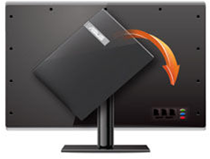
Rotatable VESA-mount

The ASUS Mini PC features a sleek design and extremely light weight, only 0.7kg (1.4 lb). ASUS Mini PC is simple, chic, and even thinner than a book !

Ultra-realistic 4K/UHD visuals and dual display support

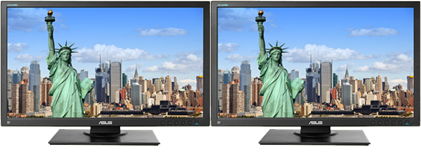
The Mini PCs feature D-sub and HDMI output ports with dual display support. On two separate screens make you more productive. The E410 also supports 4K/UHD resolution display, making it a perfect option for digital signage.

Independent Display
Clone Display

Business-Class Management

ASUS Software Management Tools for Simplified System Maintenance


Intel
ASUS Business Manager: One Stop Management and Data Protection

ASUS Business Manager is a set of program utilities for performing maintenance and optimization tasks to PCs. This software package features a one-page interface to access system monitoring tools, BIOS updates, USB Blocker data movement controls, and energy-saving controllers.

3 display Port
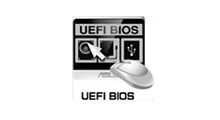
Easily set up password protection for your data with UEFI BIOS

UEFI BIOS not only provides a mouse-controlled interface that enables more flexible and convenient input, but also combines system management tools like HDD password protection and I/O port activation. A user-friendly graphics-based BIOS interface offers easier system tweaking and greater storage support.

flexible_support
ASUS Watchdog Timer

ASUS Watchdog Timer ensures the system will always run, non-stop. ASUS Watchdog Timer automatically reboots the system should it suffer an OS hiccup, to make sure remote systems keep working and don’t require expensive personnel maintenance.

Rock-Solid Security

Total Protection for Physical Assets and Virtual Data


F9 One Key Recovery
F9 One Key Recovery

The F9 key allows you to use the recovery partition to restore your PC to its original working state. (Copying your data files and making note of any customized configuration settings before using the system recovery partition is required.

AI Security
AI Security protects your data from unauthorized access and computer viruses

Management Information Systems can restrict users’ access to confidential data, including enabling or disabling external USB devices or optical drives’ data writing or reading capabilities. This also reduces the chances of incursions from viruses. It is integrated into the ASUS Business Manager to provide complete control on unwanted devices management.

ASUS Secure Delete
ASUS Secure Delete

An easy-to-use interface that allows you to permanently remove confidential data from the recycle bin. Simply launch Secure Delete and drag and drop the files to be deleted.

Kensington lock
Kensington lock slot

ASUS commercial desktops come with a Kensington lock for additional asset management and security. Keeping your hardware and confidential data inside well protected.

Utmost Reliability

Quality Your Can Trust


PC_award
ASUS Desktops -- Most recommended Windows desktop brand

Innovation, design and reliability are at the heart of all ASUS computers. ASUS has won a PCMag.com Readers' Choice Award for its desktops four years running, leading the competition in both overall satisfaction and likelihood to be recommended. This proves that ASUS is better at delivering what customers want than rival Windows desktop PC companies. ASUS also had the lowest percentage of units needing repairs within the last 12 months, further proof of its trusted quality and reliability.

* Reprinted from www.pcmag.com with permission. © 2015 Ziff Davis, Inc. All Rights Reserved.

Stringently_Quality_Test
Stringently quality tests

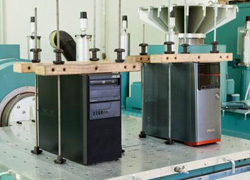
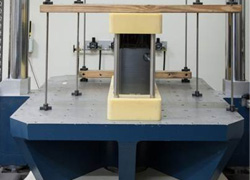
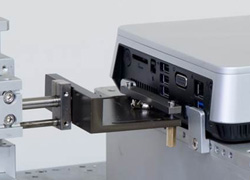
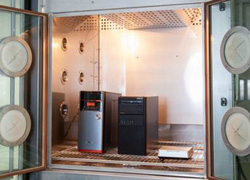
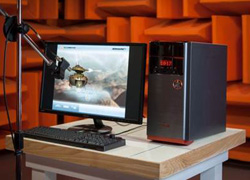
ASUS desktop PCs are subjected to a series of rigorous noise, vibration, drop, and thermal shock tests to ensure they meet our exacting standards and exceed those used by other manufacturers. So you can rest assured that your new computer can cope with extremes of dry, icy environments to hot and humid environments, as well as the bumps and knocks during shipping.

Vibration_Test
Vibration Test
Shock_Test
Shock Test
Port_Test
Port Test

Temperature_Humidity_Test
Temperature and Humidity Test
Noise_Test
Noise Test
Line_Frequency_Test
Line and Frequency Test

Efficient Energy Saving

Preserve the environment while Lowering Operating Cost


Preserves the environment

The energy-efficient ASUS Mini PCs E410 protect the environment while helping lower businesses’ operating costs. These eco-friendly workstations are recipients of some of the industry’s highest environmental certifications including ENERGY STAR.

El producto cuenta con interfaz multimedia de alta definición.
  • Todas las especificaciones están sujetas a cambios sin previo aviso. Por favor, consulte con su proveedor para ofertas exactas. Los productos pueden no estar disponibles en todos los mercados.
  • Color de la PCI y las versiones del software incluido están sujetas a cambios sin previo aviso.
  • Los nombres de las marcas y productos mencionados son marcas comerciales de sus respectivas compañías.
  • A menos que se indique lo contrario, todas las declaraciones de rendimiento se basan en el rendimiento teórico. Las cifras reales pueden variar en situaciones del mundo real.
  • La velocidad de transferencia real de USB 3.0, 3.1, 3.2 y / o Tipo-C variará dependiendo de muchos factores, incluida la velocidad de procesamiento del dispositivo host, los atributos del archivo y otros factores relacionados con la configuración del sistema y su entorno operativo.
  • La apariencia visual de las pantallas OLED puede cambiar durante la vida útil del producto. Este es un comportamiento esperado que puede incluir la persistencia de la imagen o el quemado, donde la pantalla muestra un remanente tenue de una imagen incluso después de que aparece una nueva imagen en la pantalla. Esto tiende a ocurrir solo en casos de uso extremos, como cuando una imagen estática de alto contraste se muestra continuamente durante períodos prolongados. Las computadoras portátiles ASUS con pantalla OLED minimizan este riesgo al configurar el modo oscuro de Windows 10 como predeterminado, así como acortar el tiempo de inactividad antes de que se apague la pantalla, tanto con la alimentación de la red (CA) como con la batería (CC). Este enfoque dual minimiza el potencial de quemado para maximizar la vida útil de su pantalla OLED y también reduce el consumo de energía innecesario para una duración óptima de la batería. También recomendamos ajustar el brillo de su pantalla OLED para complementar la iluminación ambiental en su entorno, en lugar de mantener la pantalla al máximo brillo en todo momento. También debe asegurarse de tener habilitado un protector de pantalla animado con fondo oscuro en la herramienta de configuración de Windows 10.
  • Pruebas de batería realizadas por ASUS el 18 de diciembre de 2020 utilizando el escenario de reproducción de video de 1080p (local). Configuración de prueba: ZenBook UM425UG, panel FHD de 250 nits, AMD R5-5500U, MX450, SSD de 256 GB, 8 GB de RAM. Configuración de prueba: WiFi habilitado pero desconectado (no conectado a ningún punto de acceso), plan de energía de Windows configurado en Equilibrado, brillo de pantalla configurado en 150 cd / m2, NumberPad apagado. La duración real de la batería puede variar según la configuración del producto, el uso, las condiciones operativas y la configuración de administración de energía. La vida útil de la batería disminuirá durante la vida útil de la batería.
  • La velocidad de carga de un cargador Power Delivery coincidirá con la potencia de salida del adaptador conectado, hasta un máximo de 65 vatios. USB-C® Easy Charge proporciona una carga de 4.5 vatios cuando se conecta a un cargador que no es Power Delivery, incluidos la mayoría de los cargadores portátiles y USB Type-A a USB-C®. Es posible que algunos cargadores portátiles no admitan estas funciones, según la configuración.
  • Los términos HDMI, HDMI High-Definition Multimedia Interface, la Imagen comercial de HDMI (Trade dress) y los logotipos de HDMI son marcas comerciales o marcas registradas de HDMI Licensing Administrator, Inc.
  • La disponibilidad de WiFi 6E puede variar según el país y sus regulaciones específicas. Función solo admitida por Windows 11 o posterior.

IPS stands for in-plane switching, a type of LED (a form of LCD) display panel technology.

Unless otherwise stated, all performance claims are based on theoretical performance. Actual figures may vary in real-world situations.

The actual transfer speed of USB 3.0, 3.1, 3.2, and/or Type-C will vary depending on many factors including the processing speed of the host device, file attributes and other factors related to system configuration and your operating environment.

Ultrabook, Celeron, Celeron Inside, Core Inside, Intel, Intel Logo, Intel Atom, Intel Atom Inside, Intel Core, Intel Inside, Intel Inside Logo, Intel vPro, Itanium, Itanium Inside, Pentium, Pentium Inside, vPro Inside, Xeon, Xeon Phi, and Xeon Inside are trademarks of Intel Corporation or its subsidiaries in the U.S. and/or other countries.

Product specifications may differ from country to country. We recommend that you check with your local dealers for the specifications of the products available in your country. Colors of products may not be perfectly accurate due to variations caused by photography and monitor settings.Due to photographic variables and conditions, actual product appearance may differ from images shown on this site.Although we endeavor to present the most accurate and comprehensive information at the time of publication, we reserve the right to make changes without prior notice.

* Result from Mobile Mark 2014 office productivity.